Orchestrate
calls, texts and email
in one workflow
A visual canvas where a single trigger sets off AI calls, SMS and email — with routing, delays and your systems in the loop, from draft to production.


canvas for AI calls, SMS and email steps
Intelligent
Build with AI — drafting built into the editor
/
runs start the moment a trigger fires
Draft
to production in one click, with watch runs in between
Trusted by Thousands of users.
Hospitality
Real Estate
Professional Services
Healthcare
Trades
" width="60px"><g opacity="0.06"><path d="M 0 0 L 0 7 M 0.768 0 L 0.768 7 M 1.549 0 L 1.549 7 M 2.191 0 L 2.191 7 M 2.833 0 L 2.833 7 M 3.475 0 L 3.475 7 M 4.118 0 L 4.118 7 M 4.76 0 L 4.76 7 M 5.403 0 L 5.403 7 M 6.045 0 L 6.045 7 M 6.687 0 L 6.687 7 M 7.329 0 L 7.329 7 M 7.972 0 L 7.972 7 M 8.614 0 L 8.614 7 M 9.256 0 L 9.256 7 M 9.899 0 L 9.899 7 M 10.541 0 L 10.541 7 M 11.183 0 L 11.183 7 M 11.826 0 L 11.826 7 M 12.468 0 L 12.468 7 M 13.11 0 L 13.11 7 M 13.753 0 L 13.753 7 M 14.395 0 L 14.395 7 M 15.037 0 L 15.037 7 M 15.68 0 L 15.68 7 M 16.322 0 L 16.322 7 M 16.964 0 L 16.964 7 M 17.607 0 L 17.607 7 M 18.249 0 L 18.249 7 M 18.891 0 L 18.891 7 M 19.534 0 L 19.534 7 M 20.176 0 L 20.176 7 M 20.818 0 L 20.818 7 M 21.461 0 L 21.461 7 M 22.103 0 L 22.103 7 M 22.745 0 L 22.745 7 M 23.388 0 L 23.388 7 M 24.03 0 L 24.03 7 M 24.672 0 L 24.672 7 M 25.315 0 L 25.315 7 M 25.957 0 L 25.957 7 M 26.599 0 L 26.599 7 M 27.242 0 L 27.242 7 M 27.884 0 L 27.884 7 M 28.526 0 L 28.526 7 M 29.169 0 L 29.169 7 M 29.811 0 L 29.811 7 M 30.453 0 L 30.453 7 M 31.095 0 L 31.095 7 M 31.738 0 L 31.738 7 M 32.38 0 L 32.38 7 M 33.022 0 L 33.022 7 M 33.665 0 L 33.665 7 M 34.307 0 L 34.307 7 M 34.949 0 L 34.949 7 M 35.592 0 L 35.592 7 M 36.234 0 L 36.234 7 M 36.876 0 L 36.876 7 M 37.519 0 L 37.519 7 M 38.161 0 L 38.161 7 M 38.803 0 L 38.803 7 M 39.446 0 L 39.446 7 M 40.088 0 L 40.088 7 M 40.73 0 L 40.73 7 M 41.373 0 L 41.373 7 M 42.015 0 L 42.015 7 M 42.657 0 L 42.657 7 M 43.299 0 L 43.299 7 M 43.942 0 L 43.942 7 M 44.584 0 L 44.584 7 M 45.227 0 L 45.227 7 M 45.869 0 L 45.869 7 M 46.511 0 L 46.511 7 M 47.153 0 L 47.153 7 M 47.796 0 L 47.796 7 M 48.438 0 L 48.438 7 M 49.081 0 L 49.081 7 M 49.723 0 L 49.723 7 M 50.365 0 L 50.365 7 M 51.007 0 L 51.007 7 M 51.65 0 L 51.65 7 M 52.292 0 L 52.292 7 M 52.935 0 L 52.935 7 M 53.577 0 L 53.577 7 M 54.219 0 L 54.219 7 M 54.862 0 L 54.862 7 M 55.504 0 L 55.504 7 M 56.146 0 L 56.146 7 M 56.788 0 L 56.788 7 M 57.431 0 L 57.431 7 M 58.073 0 L 58.073 7 M 58.715 0 L 58.715 7 M 60 0 L 60 7" fill="transparent" height="7px" id="zDJUEnHbd" stroke-dasharray="" stroke-linecap="butt" stroke-linejoin="miter" stroke-miterlimit="10" stroke-width="0.04" stroke="rgb(65, 23, 94)" width="60px"/></g></g></svg>)
One trigger. Every channel. Fully orchestrated.
Voice, SMS and email aren't separate automations — they're steps in one workflow that share the same data, branch on your rules, and fire with timing built in. Build a flow from a description or by hand, then ship from draft to production with every run kept in history.
"/><stop offset="1" stop-color="rgb(129, 75, 238)"/></linearGradient></defs><path d="M 7.534 14.466 L 0.647 11.929 C 0.457 11.859 0.293 11.732 0.178 11.566 C 0.062 11.4 0 11.202 0 11 C 0 10.798 0.062 10.6 0.178 10.434 C 0.293 10.268 0.457 10.141 0.647 10.071 L 7.534 7.534 L 10.071 0.647 C 10.141 0.457 10.268 0.293 10.434 0.178 C 10.6 0.062 10.798 0 11 0 C 11.202 0 11.4 0.062 11.566 0.178 C 11.732 0.293 11.859 0.457 11.929 0.647 L 14.466 7.534 L 21.353 10.071 C 21.543 10.141 21.707 10.268 21.822 10.434 C 21.938 10.6 22 10.798 22 11 C 22 11.202 21.938 11.4 21.822 11.566 C 21.707 11.732 21.543 11.859 21.353 11.929 L 14.466 14.466 L 11.929 21.353 C 11.859 21.543 11.732 21.707 11.566 21.822 C 11.4 21.938 11.202 22 11 22 C 10.798 22 10.6 21.938 10.434 21.822 C 10.268 21.707 10.141 21.543 10.071 21.353 Z" fill="url(%23tFYyCrIqo-1587709817-linear-gradient)" height="22px" id="tFYyCrIqo" transform="translate(1.25 1.25)" width="22px"/></svg>)
Inside the platform
From webhook to won lead, in one build
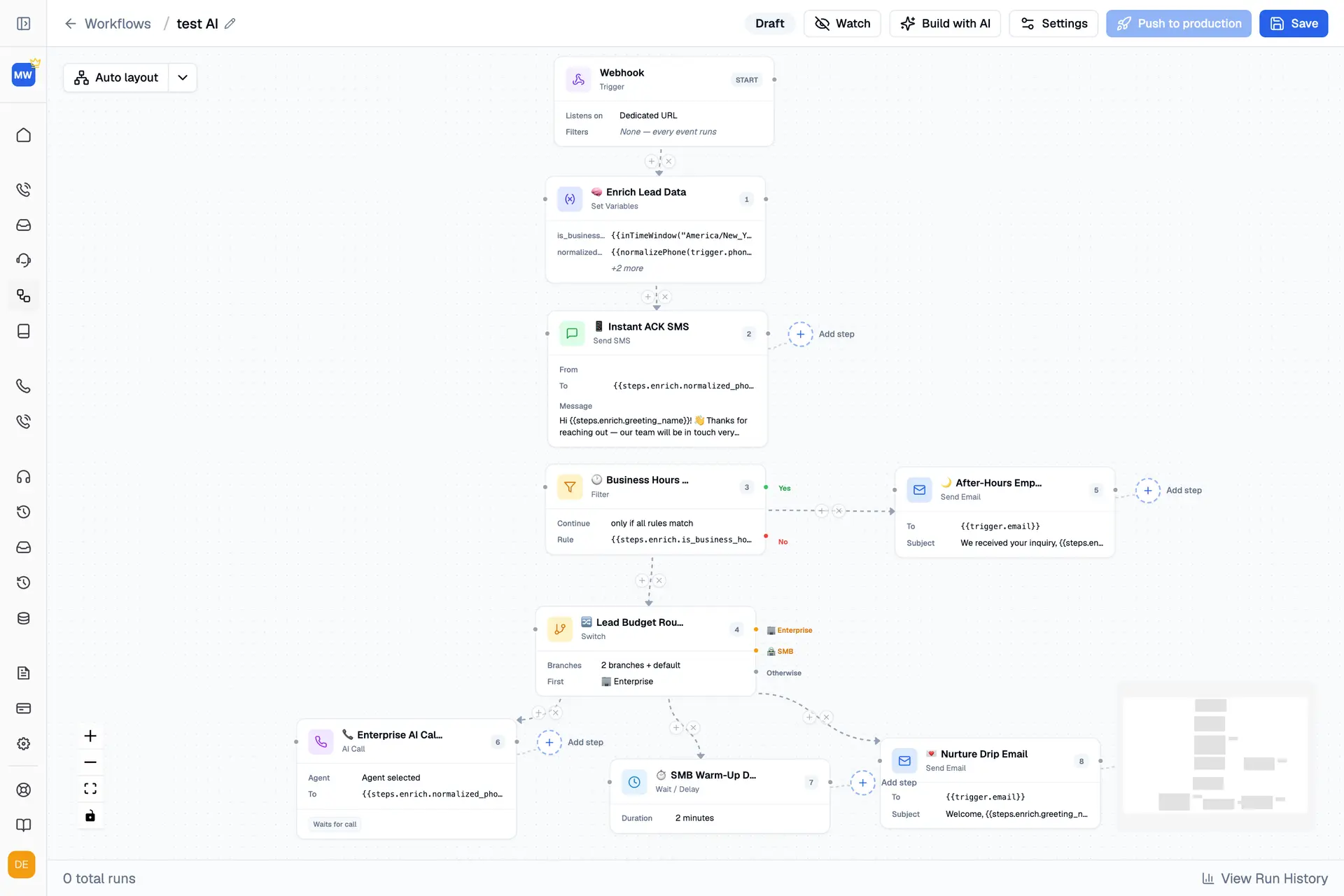
This canvas is a complete speed-to-lead play: a webhook fires, the lead gets an instant text, business hours decide the path, an enterprise lead gets an AI call while an SMB lead enters a warm-up drip. Everything an agency sells — response, routing, follow-through — assembled visually and pushed to production.
How it works
From trigger to outcome, every run
Conversation outcome
On voice or messaging
Customers need clear next steps
Key capabilities
Triggers & systems
Triggered by your stack, acting on your stack
Every workflow starts from a webhook — any system that can send an event can start a run, with the event’s data available to every step as variables.
Outcomes are written back into your live tools through the same integrations as every Trillet channel. No parallel systems. No double entry.
During a run
Lead enriched — variables set from the event
Acknowledgment SMS sent in seconds
AI call placed on the enterprise branch
Outcome written back to your CRM
CRM & scheduling integrations
GoHighLevel
Zoho CRM
Salesforce
Google Calendar
Cal.com
Stripe
+ more
Actions written into
CRM
Internal systems
Calendars
Payment systems
+ more
Compliance & control
Automation you can audit
HIPAA, GDPR and ACMA compliant, with TCPA and DNC support on outbound calling steps.
Full audit logs and role-based access.
Complete run history — every step of every run, logged.
Draft and production kept separate — changes ship only when you push them.
FAQ
Benefits designed for your growth.
What starts a workflow?
Any webhook — a form fill, a new lead, or any event your systems can send. The run starts with that event's real data, available to every step as variables.
Which channels can one workflow orchestrate?
How does it connect to our systems?
How do we test a workflow before it goes live?
Is it compliant enough for regulated automation?
Still have questions?
We can help you out
"/><stop offset="0.43902439024390244" stop-color="rgba(199, 98, 246, 0.2)"/><stop offset="1" stop-color="rgba(129, 75, 238, 0)"/></linearGradient></defs><path d="M 0 20.792 L 22.255 0 L 22.746 0.735 C 22.99 1.102 23.27 1.444 23.582 1.755 L 23.595 1.769 C 24.128 2.301 24.748 2.738 25.428 3.061 C 25.831 3.252 26.253 3.402 26.687 3.508 L 59.459 11.512 L 39.302 33.834 Z" fill="url(%23Aq0U4CoNa-1003380745-linear-gradient)" height="33.833519163763064px" id="Aq0U4CoNa" transform="translate(0.209 0.064)" width="59.4591637630662px"/></svg>)
"/><stop offset="0.3860467030768131" stop-color="rgba(199, 98, 246, 0.2)"/><stop offset="1" stop-color="rgba(129, 75, 238, 0)"/></linearGradient></defs><path d="M 0.47 32.901 L 0 0 L 0.47 0.94 L 0.94 1.41 L 29.529 17.889 L 27.541 53.404 Z" fill="url(%23alP1Nx1gU-3900960161-linear-gradient)" height="53.40383999820837px" id="alP1Nx1gU" transform="translate(0.206 0.216)" width="29.528711999999974px"/></svg>)

"/><stop offset="0.43902439024390244" stop-color="rgba(199, 98, 246, 0.2)"/><stop offset="1" stop-color="rgba(129, 75, 238, 0)"/></linearGradient></defs><path d="M 8.26 33.497 L 0 0 C 0.302 1.223 1.161 2.232 2.32 2.724 L 2.78 2.92 L 6.777 4.509 L 49.544 17.138 L 57.072 51.845 Z" fill="url(%23Jy4hAiuvx-123410858-linear-gradient)" height="51.8449px" id="Jy4hAiuvx" transform="translate(1 1)" width="57.0716px"/></svg>)
"/><stop offset="1" stop-color="rgba(129, 75, 238, 0)"/></linearGradient></defs><path d="M 0 23.991 L 25.705 0 C 26.418 1.135 27.326 2.138 28.388 2.965 L 28.992 3.435 C 29.593 3.903 30.228 4.328 30.89 4.707 L 31.231 4.901 C 32.926 5.869 34.747 6.603 36.643 7.084 L 80 18.074 L 55.684 40 Z" fill="url(%23m6mpMGm1l-1029907898-linear-gradient)" height="40px" id="m6mpMGm1l" transform="translate(0.277 0.183)" width="80px"/></svg>)